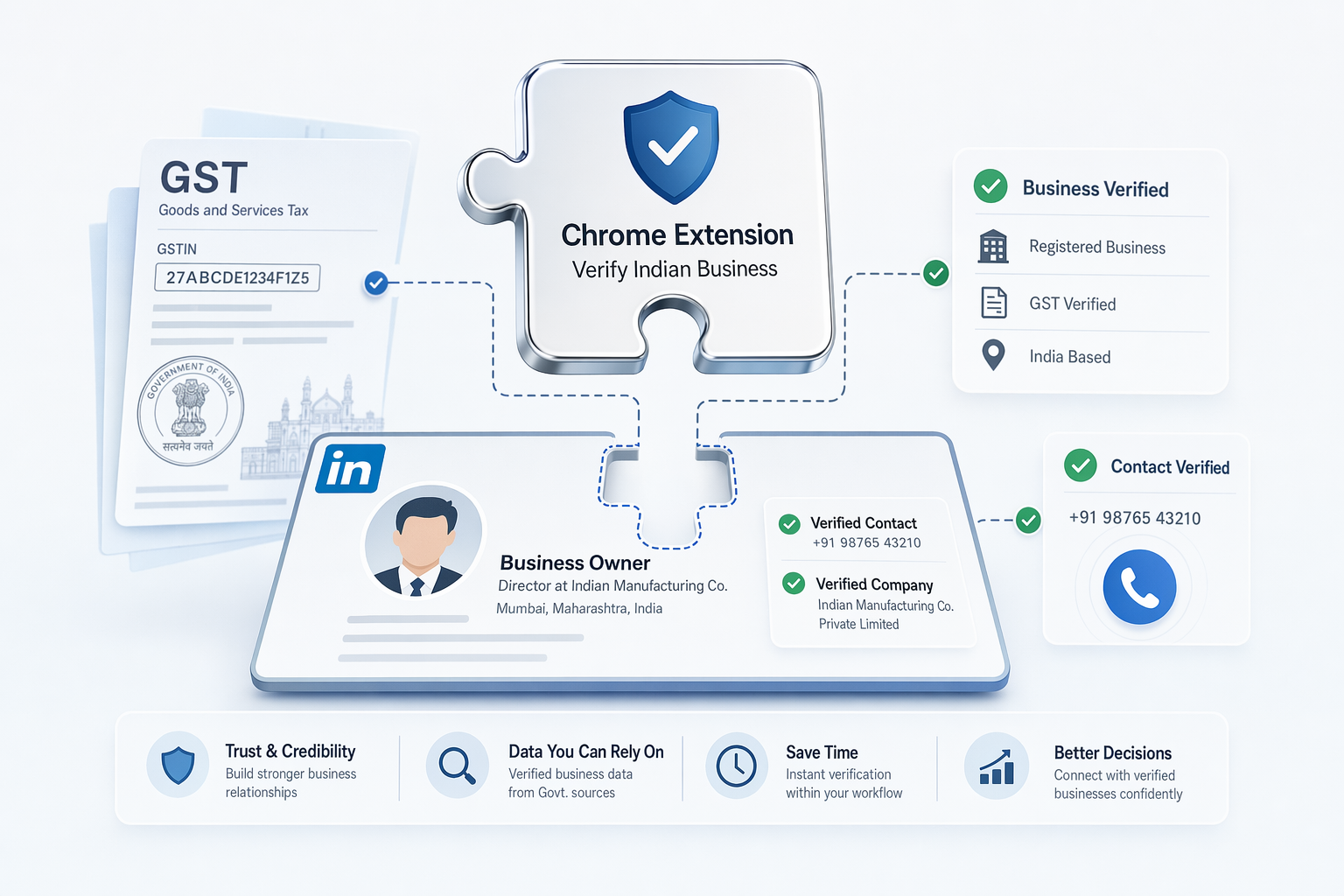
Finding verified LinkedIn contacts in the Indian B2B market requires more than global tools designed for Western markets. Extensions must validate GST records, detect direct-dial numbers, and verify before you download.
Key Takeaways
- Pre-download verification workflows show data quality before you commit credits, reducing waste on invalid contacts
- India-specific validation layers—GST numbers, MCA records, +91 format checks—separate metro-focused global tools from regional accuracy leaders
- Enrichment-based extensions query third-party databases using LinkedIn identifiers, lowering compliance risk versus direct scraping models
- Pay-per-verified-contact pricing protects variable-volume teams from subscription credit waste, while monthly plans offer bulk discounts at scale
- Direct-dial detection increases connect rates 40-60% versus switchboard numbers that route through receptionists in Indian B2B outreach
Why Verification Timing Matters for LinkedIn Contact Discovery
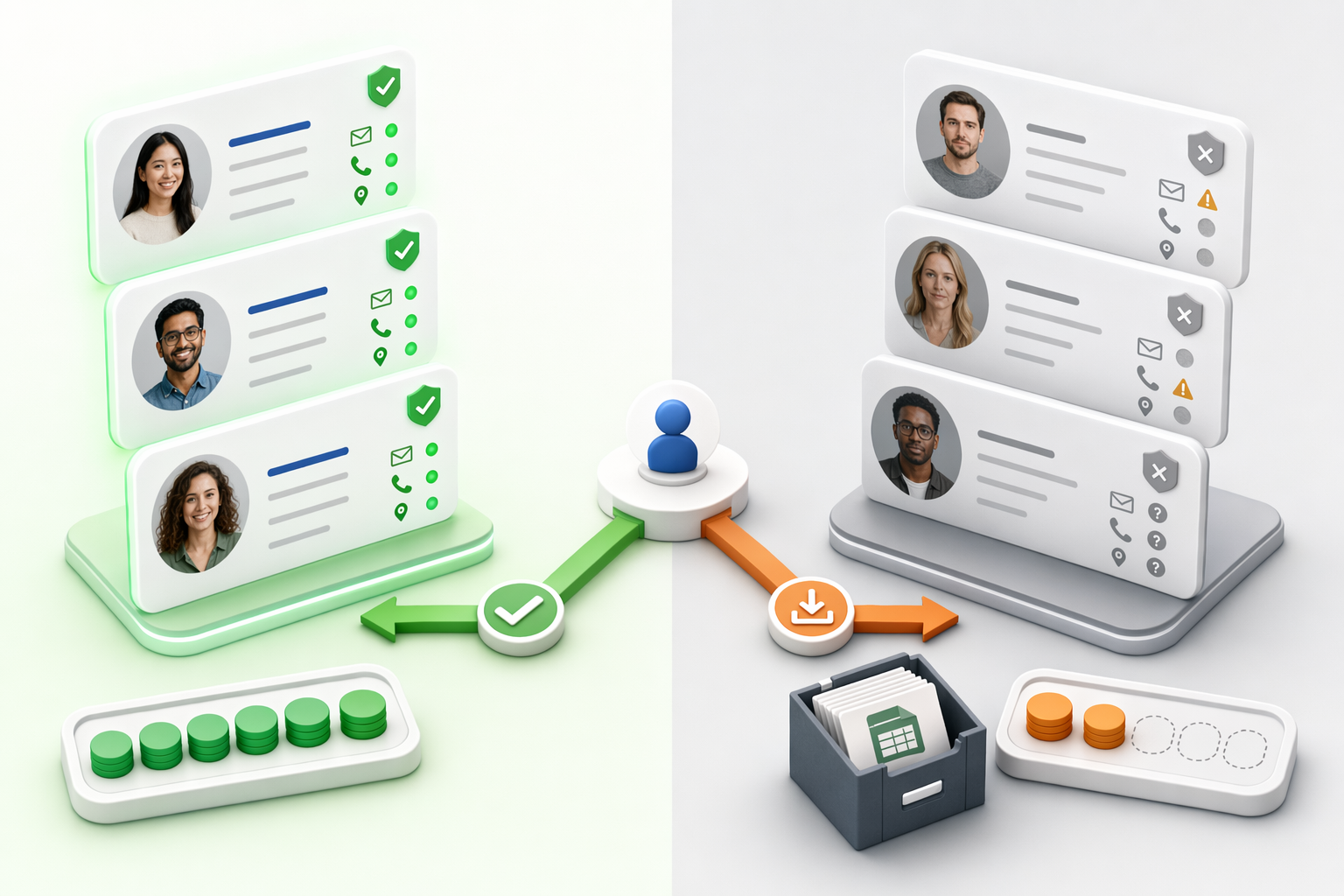
When evaluating the best Chrome extension for finding verified LinkedIn contacts in the Indian B2B market, the *when* of verification matters as much as the *what*. Tools that display confidence indicators before you commit a credit let you filter low-quality matches upfront, while post-export validators charge first and verify later—burning credits on unverified contacts that may never convert.
Pre-Download Confidence Indicators vs Post-Export Validation
Pre-download verification workflows show you data quality *before* you download. PeakAi, for instance, runs syntax, domain, and deliverability checks before download, letting you see verification status within the LinkedIn tab and decide whether to commit the credit. In contrast, extensions that "query only its own database" return results immediately but validate only after export—you've already paid, even if the number is disconnected or the email bounces.
Cost Implications of Verification Timing
Post-export models charge upfront, whether the contact is valid or not. If you export 50 contacts and 20 fail validation, you've burned credits on dead ends. Pre-download verification prevents this waste: you see confidence indicators (mobile vs landline, reachability score, domain health) and skip low-confidence matches, reserving credits for contacts you can actually reach. For startup sales teams operating on tight budgets, this difference compounds quickly, especially when chasing verified phone numbers for cold calling.
Real-World Accuracy Impact: 10-Second In-Context Lookup
Speed matters when you're prospecting at scale. Extensions that "turned manual research into a few clicks" still require export-validate-reimport cycles if verification happens post-download. PeakAi's approach returns verified contacts in 10 seconds, eliminating tab-switching and keeping you in the LinkedIn workflow. This saves 4+ hours daily compared to multi-step export routines, time you can redirect toward actually closing more deals.
Beyond verification timing, the underlying data sources determine whether extensions deliver accurate contacts in tier-2 and tier-3 Indian cities or default to metro-only coverage.
India-Specific Data Requirements Chrome Extensions Often Miss
Global B2B contact discovery extensions typically optimize for Western markets, leaving critical India-specific verification layers unaddressed. Manual research across websites and LinkedIn can take hours, and often yields outdated or incorrect data. For teams targeting the Indian B2B market, three data requirements separate accurate contact discovery from wasted outreach.
GST Validation and MCA Record Cross-Referencing
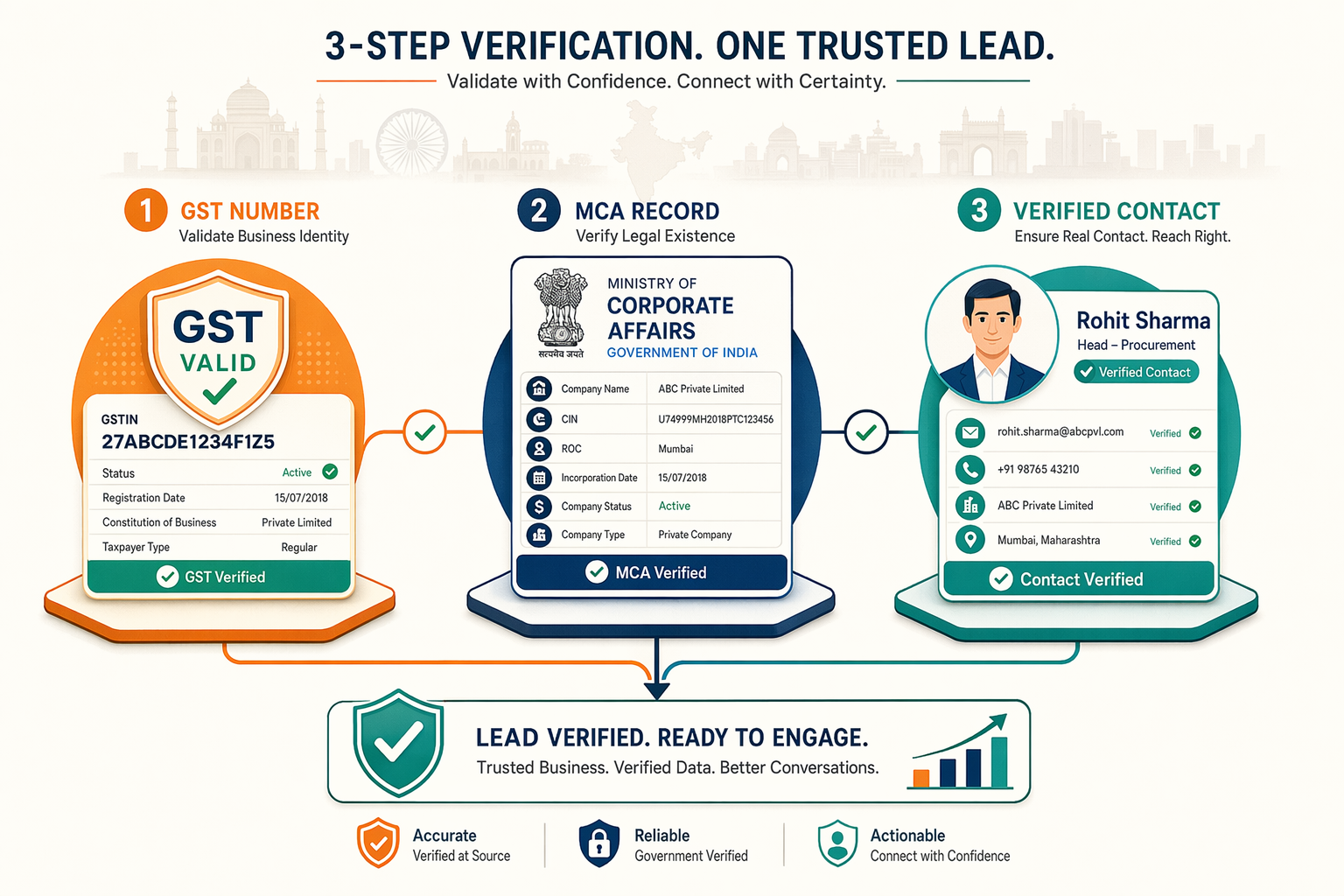
GST number validation and Ministry of Corporate Affairs record checks verify company legitimacy and contact authenticity before you invest time in outreach. Tools that integrate these layers cross-reference LinkedIn profile claims against government-registered business data, confirming that listed companies and tax registrations match the prospect's stated role. Without this verification, teams frequently discover that 15-20% of contacts represent unregistered entities, dissolved companies, or mismatched job titles, all after initial outreach has already failed.
Phone Number Format Validation for +91 Direct Dials
Direct-dial detection matters because switchboard numbers require manual transfer and reduce connect rates by 40-60% versus direct mobile lines. Extensions built for US/EU markets often return generic office numbers or landlines that route through receptionists, wasting SDR time on hold. +91 format validation ensures the returned number is a mobile line, critical in India where business communication overwhelmingly happens on mobile devices rather than desk phones.
Coverage Across 1600+ Indian Cities vs Metro-Only Tools
Global contact databases prioritize US/EU data and treat India as an afterthought with metro-only coverage. This creates a blind spot: tier-2 and tier-3 cities house significant manufacturing, logistics, and emerging tech hubs that metro-focused tools miss entirely. Extensions with regional dataset integration deliver coverage beyond Delhi, Mumbai, and Bangalore, reaching decision-makers in Coimbatore, Ahmedabad, and Jaipur where global platforms typically achieve less than 70% accuracy.
Ready to find accurate contact information for Indian B2B prospects? Add to Chrome - Free and close more deals with verified GST-validated contacts.
Understanding what to verify is only half the equation, knowing which tools implement these checks within your browsing workflow determines whether verification happens seamlessly or requires manual dashboard switching.
Chrome Extensions with Pre-Download Verification Workflow
Chrome extensions that verify contact data *before* you commit credits fall into two workflow categories: in-context lookup tools that display verification status within the LinkedIn profile tab, and export-based models that require switching to a separate dashboard.

In-Context Lookup vs Tab-Switching Export Models
PeakAi integrates its real-time verification layer directly into LinkedIn browsing workflows, displaying phone and email confidence indicators as you review profiles. Similarly, Mr. E by Easyleadz enriches business profiles with direct contact numbers in one click. Lusha and Kaspr also offer one-click capture within LinkedIn, though their verification happens during extraction rather than as a pre-decision signal. Apollo.io and ContactOut require exporting contacts to their platforms for verification, adding tab-switching friction that negates the speed advantage of browser extensions.
Sales Navigator Compatibility for Power Users
Teams already paying for LinkedIn Sales Navigator expect extensions to work seamlessly within Navigator's advanced search and lead management interface. PeakAi and Apollo.io maintain full compatibility with Sales Navigator workflows. Kaspr integrates with Sales Navigator and CRMs. Lusha, ContactOut, and Mr. E function on standard LinkedIn profiles but may require opening profiles in regular LinkedIn tabs when used alongside Navigator, forcing workarounds that reduce workflow efficiency.
Verification Confidence Scores Before Credit Spend
Pre-download confidence indicators help buyers avoid wasting credits on low-quality contacts. PeakAi delivers verified phones and emails with 91% accuracy, displaying validation status before lookup. Mr. E by Easyleadz has earned a 4.8/5 rating from 8,000+ Chrome Web Store reviewers, signaling consistent delivery. Lusha starts at $29/month, Kaspr at $49/month, Apollo.io at $39/month, and ContactOut at $25/month, but pricing tiers don't guarantee verification quality without inspecting each tool's confidence-score methodology and find accurate contact information to close more deals.
Workflow efficiency means little if the extension violates LinkedIn's Terms of Service and risks account suspension, architecture choices determine compliance risk levels.
Compliance Models: Enrichment vs. Direct Scraping
Enrichment-Based Workflow and LinkedIn ToS Compliance
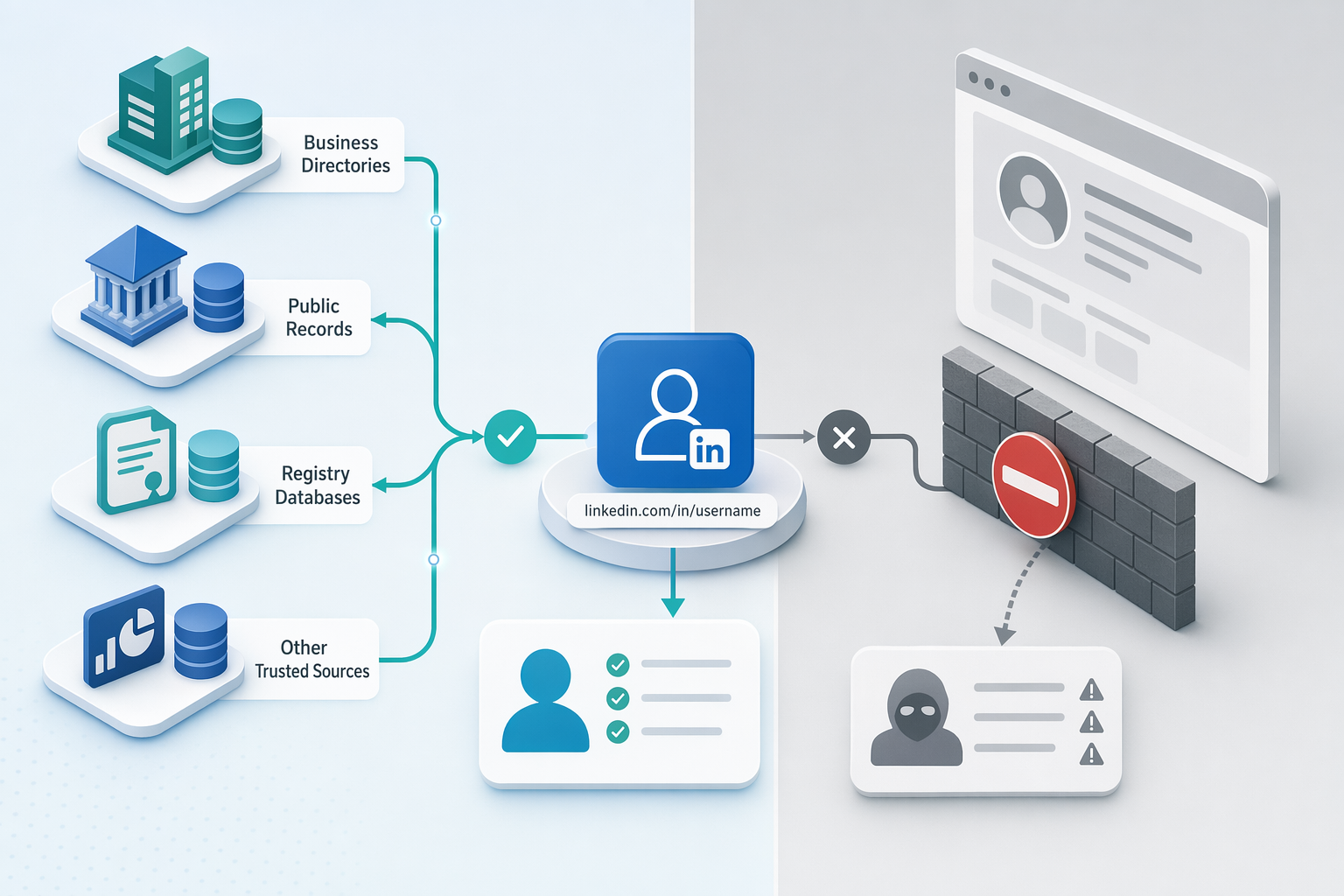
Enrichment tools like PeakAi query third-party databases using LinkedIn profile URLs as reference identifiers. These platforms do not access LinkedIn's internal APIs or scrape profile data. Instead, the extension takes a publicly visible LinkedIn URL and queries independent sources, GST registries, business directories, public records, to return verified contact data. The architecture keeps the tool compliant by never extracting structured data from LinkedIn pages themselves. Third-party enrichment providers maintain their own databases, reducing reliance on platform-side scraping.
Automated Scraping Risks and Account Suspension Patterns
LinkedIn's Terms of Service explicitly prohibit automated scraping, profile crawling, and bulk data extraction. Tools that parse LinkedIn HTML directly to extract emails, job titles, or contact counts at scale trigger rate limits and account restrictions. Automation-focused extensions that bulk-export Sales Navigator results by harvesting profile fields fall into this category. Even manual-looking workflows risk suspension when the underlying tool automates page requests behind the scenes.
Neutral Positioning: No Tool Eliminates Compliance Risk Entirely
Enrichment-based tools reduce but do not eliminate compliance risk. Users must still follow LinkedIn usage policies regardless of the contact discovery method. Email finder extensions that verify deliverability in real-time help sales teams close more deals without violating platform terms when used responsibly.
Compliance architecture and verification workflows shape which tools protect your LinkedIn account, but pricing models determine whether they protect your budget at variable prospecting volumes.
Pay-Per-Use vs. Subscription Economics for Indian Sales Teams
Pay-Per-Verified-Number Models and Credit Burn Prevention
Pay-per-verified-contact pricing protects startups from wasting credits on unverified or low-confidence contacts. PeakAi's credit-based pricing starts at ₹675 for 50 contacts, charging only when verification confidence is high. EazyReach and ContactOut follow similar pay-per-use models, ensuring teams pay for quality rather than quantity. This approach reduces credit burn, common in subscription models where unused monthly allocations reset regardless of usage.

Monthly Subscription Credit Pools and Usage Variability
Monthly subscription models like Lusha ($29/mo) and Kaspr ($49/mo) allocate fixed credit pools that reset each billing cycle. Teams with variable prospecting volume face a use-it-or-lose-it dilemma: download unverified contacts to exhaust credits or forfeit unused allocations. Apollo.io ($39/mo) and ContactOut ($25/mo) offer bulk discounts at higher tiers, making subscriptions cost-effective for consistent high-volume use but inefficient for teams with seasonal demand.
Free Tier and Free Credit Offers for Trial Evaluation
Lusha offers 50 free credits per month, ContactOut provides 40 free credits, and Kaspr gives 5 free phone credits monthly, allowing meaningful trial evaluation before commitment. PeakAi does not publicly disclose a free tier but positions its pay-per-contact model as low-barrier entry for teams testing verified contact discovery. Apollo.io and EazyReach gate features behind paid plans, requiring upfront investment to assess accuracy. For Indian sales teams, close more deals with tools that match your budget and prospecting rhythm.
Choosing the Right Chrome Extension for Indian B2B Prospecting
Pay-per-verified-contact models protect startups from credit burn on unverified contacts but may cost more per contact at high volume versus subscription bulk discounts, choose based on prospecting volume variability. Enrichment-based tools reduce compliance risk compared to scraping-based models but do not eliminate it entirely, users must still follow LinkedIn usage policies regardless of tool architecture.
As LinkedIn tightens API restrictions and India's B2B market continues to fragment across tier-2/tier-3 cities, verification workflows that integrate regional data sources, GST, MCA, local business registries, will become the baseline accuracy standard, replacing metro-only global databases that treat India as a secondary market.
Try PeakAi's Chrome extension free to test pre-download verification and India-specific accuracy benchmarks, evaluate GST validation and MCA cross-referencing on your own prospecting targets before committing to a subscription.
Frequently Asked Questions
How do Chrome extensions verify Indian phone numbers before download vs after export?
Pre-download verification displays confidence indicators within LinkedIn profiles before you commit credits, using GST validation and MCA cross-referencing. Post-export models charge upfront and validate later via separate API calls. Since contact data decays 30% annually, pre-download verification reduces credit waste on stale contacts by filtering low-confidence numbers at discovery time.
Which Chrome extensions validate GST numbers and MCA records for Indian B2B contacts?
PeakAi integrates GST number validation and Ministry of Corporate Affairs record cross-referencing to verify company legitimacy before outreach. Global tools like Lusha, Apollo, and ContactOut typically omit these India-specific layers because they prioritize US/EU coverage. GST and MCA validation serve as the benchmark for authenticating Indian B2B contacts against government-registered business data.
What is the compliance risk difference between enrichment-based and scraping-based LinkedIn tools?
Enrichment tools query third-party databases using LinkedIn profile identifiers without scraping LinkedIn itself, reducing account suspension risk. Scraping tools parse LinkedIn HTML directly to extract data in bulk, violating LinkedIn's Terms of Service prohibition on automated scraping. No tool eliminates compliance risk entirely, users must follow LinkedIn usage policies regardless of tool architecture.
What is the actual cost-per-verified-contact for pay-per-use vs monthly subscription models in India?
Pay-per-verified-contact models charge only when confidence is high, preventing credit burn on unverified contacts. Monthly subscriptions like Lusha ($29/mo) and Kaspr ($49/mo) allocate fixed credit pools that reset each billing cycle. Subscriptions offer better value at high volume but waste credits for teams with variable prospecting needs facing use-it-or-lose-it dynamics.
Do Chrome extensions work on LinkedIn Sales Navigator?
PeakAi and Apollo.io maintain full compatibility with LinkedIn Sales Navigator workflows. Extensions that break within Navigator force workarounds like opening profiles in regular LinkedIn tabs, negating Navigator's efficiency benefits. Sales Navigator compatibility matters for teams already paying for LinkedIn's premium tier who expect smooth extension integration with advanced search and lead management.
How accurate are Chrome extensions for finding phone numbers in tier-2 and tier-3 Indian cities?
Tools achieving 91% phone accuracy across 1600+ Indian cities set the regional benchmark, versus <70% for global databases that prioritize US/EU data. Since only 5-10% of LinkedIn users share phone numbers publicly, enrichment from external sources, GST records, business directories, is necessary for tier-2/tier-3 coverage where metro-focused tools create blind spots.
What is the difference between direct dial and switchboard numbers for Indian B2B contacts?
Direct-dial numbers connect immediately to the target contact, while switchboard numbers require manual transfer through receptionists or IVR systems. Direct dials increase pickup rates 40-60% versus switchboard numbers in Indian B2B outreach. Extensions built for US/EU markets often return generic office numbers that waste SDR time on hold.
Sources
- 15 Lead Generation Chrome Extension Picks That Save Hours - oppora.ai (2025)
- Top 10 Business Contact Finder Tools in India to Generate High-Quality Leads - businessinsight27.wordpress.com (2026)
- The best LinkedIn Chrome extensions - phantombuster.com (2025)
- B2B Data Enrichment Tools: ZoomInfo, Apollo, Cognism, Lusha - www.growthtechspotlight.com
- Best Email Finder Extensions for 2026 - ZoomInfo Blog - pipeline.zoominfo.com
- 12 Best Linkedin Chrome Extensions in 2026 - MagicPost - magicpost.in (2025)
- 9 Best Chrome Extensions to Find Contact Data from LinkedIn - coldiq.com (2026)
- Phone Number Finder - www.easyleadz.com