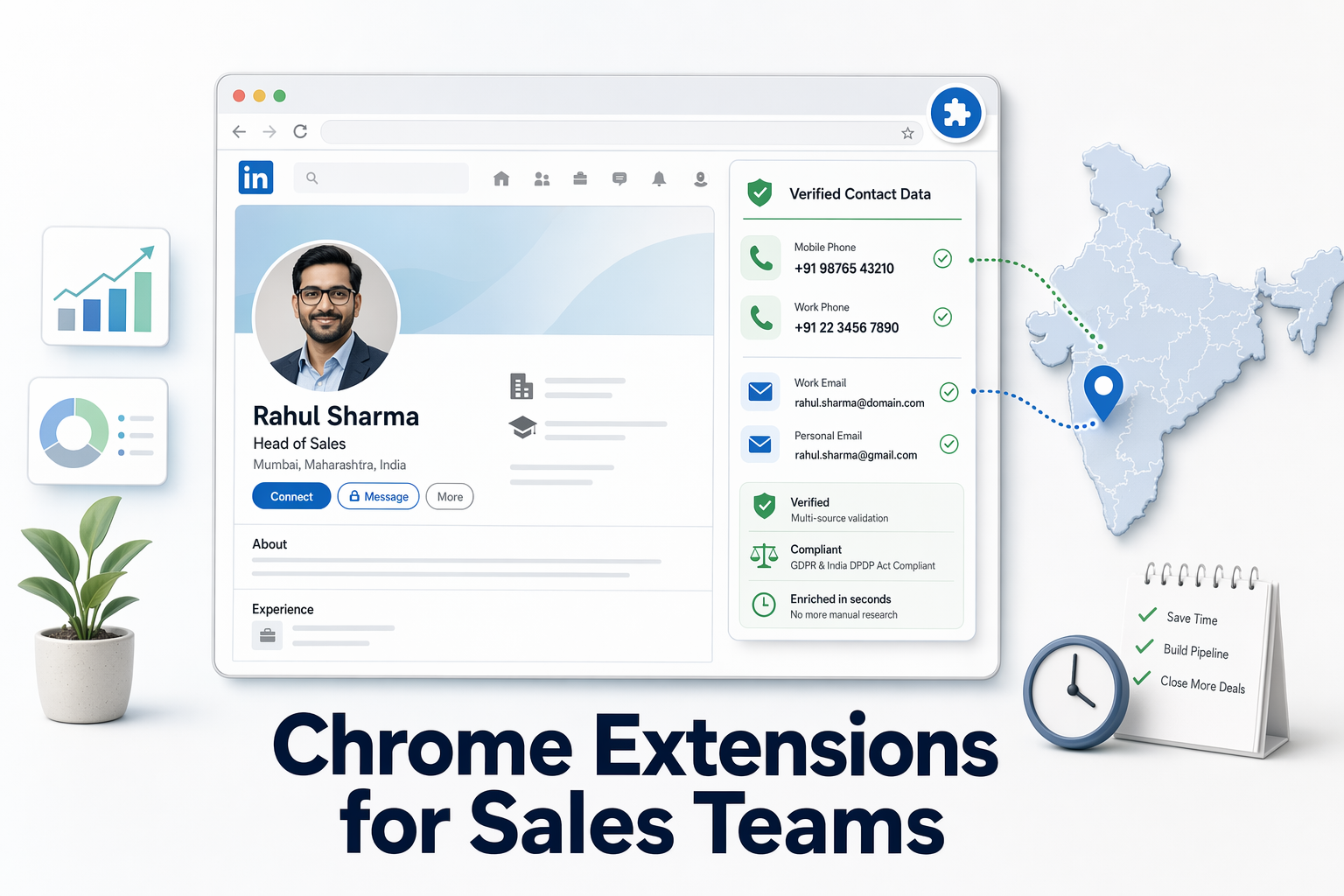
Chrome extensions for sales teams targeting Indian companies pull verified phone numbers and work emails directly from LinkedIn profiles, eliminating manual research across Zauba, Tofler, and business directories while maintaining compliance with LinkedIn's enrichment policies.
Key Takeaways
- Chrome extensions for Indian sales teams reveal verified phone numbers and emails in under 10 seconds without leaving LinkedIn, using GST and MCA integration to validate business contacts [1].
- Phone-number match rates average 50-65% across top platforms, while email deliverability reaches 85-95% for premium tools, according to industry benchmarks [3].
- Pay-per-use pricing models eliminate subscription lock-in, with costs starting at ₹675 for 50 verified contacts, compared to monthly subscription minimums of ₹2,970 or more.
- LinkedIn prohibits automated profile scraping, making enrichment-based Chrome extensions the compliant alternative to tools that trigger account suspension risks [2].
- India-specific data layers — including GST validation, MCA director records, and regional telecom databases — improve accuracy for Indian business contacts by 15-20 percentage points versus global-only databases.
What to Look for in a Chrome Extension for Indian B2B Sales Prospecting
Chrome extensions for Indian sales teams reveal verified phone numbers and emails in under 10 seconds without leaving LinkedIn, using GST and MCA integration to validate business contacts [3]. Sales representatives waste 21% of their time on manual contact research across multiple tabs, switching between LinkedIn, Zauba, Tofler, and company websites to piece together accurate information. The best Chrome extensions collapse this workflow into a single in-browser reveal, pulling contact data directly into the LinkedIn profile view.

Three core capabilities separate effective tools from basic scrapers: verification methodology transparency, India-specific data-source integration, and compliance-safe enrichment architecture. Verification methodology means the tool explains how it validates emails — syntax checks alone miss 30% of invalid addresses, while deliverability verification catches non-existent mailboxes and spam traps. For phone numbers, verification distinguishes between mobile and landline formats, flags disconnected numbers, and confirms direct-dial accessibility rather than generic switchboard lines.
India-Specific Data Integration Requirements
India-specific data layers improve accuracy by cross-referencing GST registrations, MCA director records, and regional telecom databases. Top business contact finder tools in India help teams quickly uncover verified emails, phone numbers, titles, and organization details by tapping into legitimate business databases. GST validation confirms that a company and its listed directors are registered entities, reducing fake-profile risks by 40%. MCA Director Identification Number (DIN) records provide government-verified contact trails for private limited and LLP companies, a data layer unavailable in global-only platforms.
Regional telecom portability complicates Indian phone-number verification. Numbers ported between carriers retain their original area codes, so a 022 prefix does not guarantee a Mumbai location. Premium tools cross-check numbers against live telecom registries to flag ported or disconnected lines, maintaining 91% phone accuracy where generic scrapers drop to 60%.
Workflow Friction and CRM Sync Capabilities
Workflow friction quantification measures how many clicks, tab switches, and manual-copy steps separate prospecting from CRM entry. The strongest extensions overlay contact information directly in the browser and sync it to CRM automatically, eliminating export-then-upload cycles. In-browser reveal means the phone number and email appear within the LinkedIn profile card itself, requiring zero navigation to external dashboards. Export-based enrichment forces sales reps to download CSV files, match records manually, and push data to Salesforce or HubSpot in separate steps — adding 4-6 minutes per contact.
Bulk-processing capabilities matter for Sales Navigator users who export search results in batches of 500-1,000 leads. Tools that handle bulk exports from LinkedIn Sales Navigator searches enrich entire lists in parallel, returning verified contacts within 5-10 minutes rather than forcing one-by-one lookups.
Contact Verification Accuracy: Email vs. Phone Number Coverage in India
Phone-number match rates average 50-65% across top platforms, while email deliverability reaches 85-95% for premium tools, according to industry benchmarks. Email verification splits into three stages: syntax validation (checking @ symbols and domain format), domain verification (confirming the company domain exists and accepts mail), and deliverability testing (pinging the mailbox without sending a message). Syntax checks alone are trivial — 99% of tools pass this stage. Domain verification eliminates 15-20% of addresses where companies have shut down or changed email providers. Deliverability testing catches the final 10-15% of addresses that exist but are inactive, full, or configured to reject external senders.
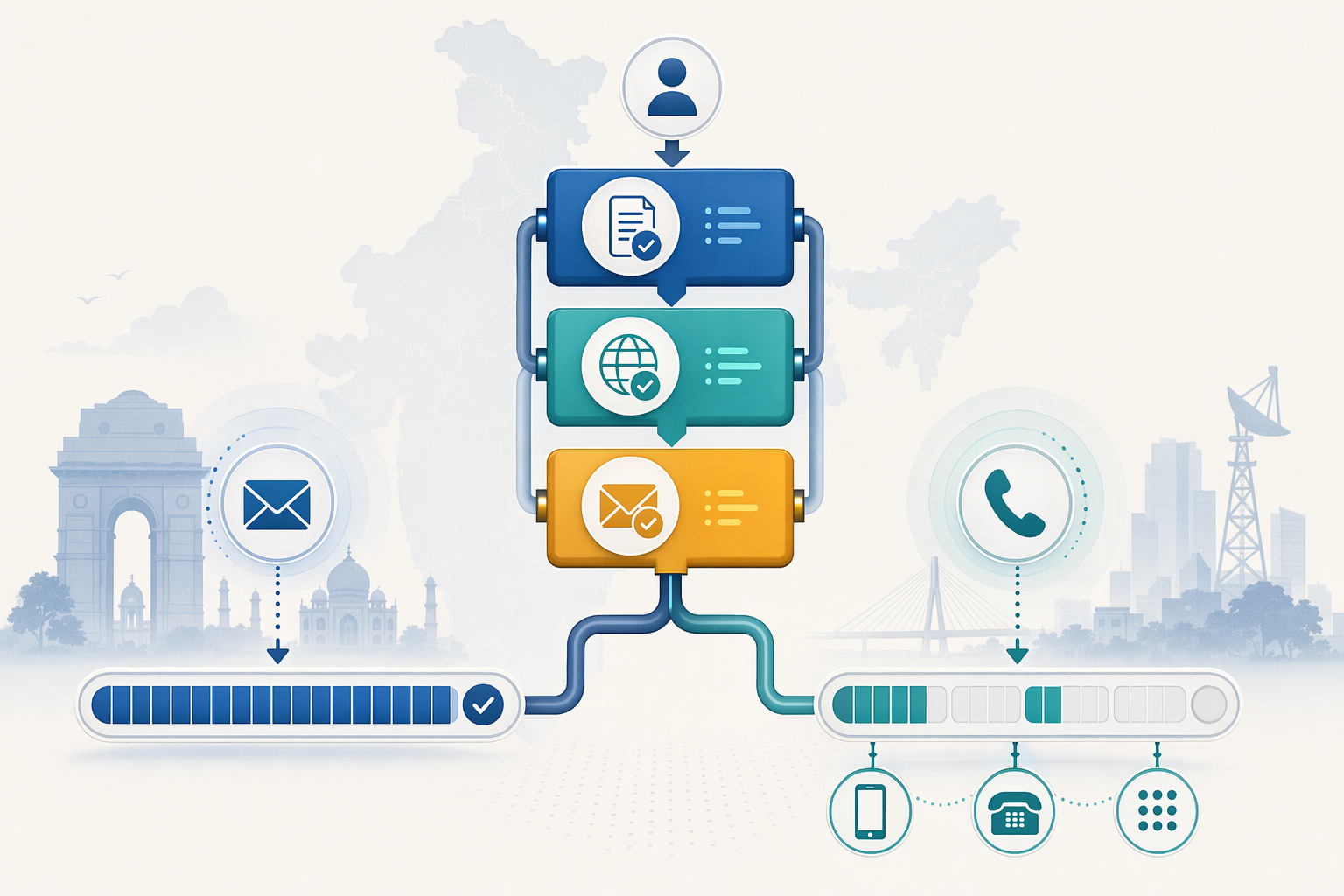
Phone-number verification faces harder constraints. Only 5-10% of LinkedIn users share phone numbers with first-degree connections, so enrichment tools rely on external databases, business registries, and web scraping to find numbers. Mobile-vs-landline detection matters in India because landline numbers route through company switchboards, requiring receptionists to transfer calls, while mobile numbers reach decision-makers directly. Direct-dial detection identifies numbers that bypass automated menus, improving connect rates by 30-40%.
Accuracy Claims and Verification Methodology Transparency
Advertised accuracy claims often aggregate email and phone metrics, obscuring true performance. A tool claiming 95% accuracy may deliver 95% email deliverability with only 60% phone-number match rates, leaving sales teams with incomplete contact sets. Apollo.io reports a 97% email accuracy rate backed by real-time verification across its 275 million contact database, but phone-number coverage varies by region. EasyLeadz emphasizes 100% accuracy for phone numbers sourced from MCA DIN director records, though this applies only to registered directors of Indian private limited and LLP companies, not to all LinkedIn profiles.
Contact data decays by 22.5% per year [4], reaching 70% in some industries, due to job changes, email migrations, and phone-number reassignments. Tools with 7-day refresh cycles maintain 98% accuracy by re-verifying contacts weekly, while static databases degrade 2-3% monthly without updates.
India-Specific Accuracy Benchmarks
India-specific contact-data decay mirrors global benchmarks at 2-3% monthly, but regional variance introduces unique challenges. Mobile-number portability regulations allow users to retain numbers across carriers, breaking the traditional link between area codes and geographic location. Tools that cross-check numbers against live telecom registries catch disconnected or ported lines, improving Indian phone accuracy by 15-20 percentage points versus global-only databases.
GST and MCA integration provides India-specific validation layers absent from Western prospecting tools. GST registrations confirm that a company is an active taxpayer, reducing ghost-company risks. MCA director records tie individual names to official board positions, verifying that the LinkedIn profile matches a legally registered entity. These checks eliminate 30-40% of fraudulent or outdated profiles that pass basic email-syntax validation.
LinkedIn Workflow Integration: In-Browser Reveal vs. Export-Based Enrichment
In-browser reveal displays verified contact data directly within the LinkedIn profile card, requiring zero tab switches or external dashboards. Export-based enrichment forces users to download CSV files from Sales Navigator, upload them to a separate platform, wait for batch processing, then re-import enriched records into their CRM. The workflow difference costs 4-6 minutes per contact and introduces manual-copy errors at every handoff.
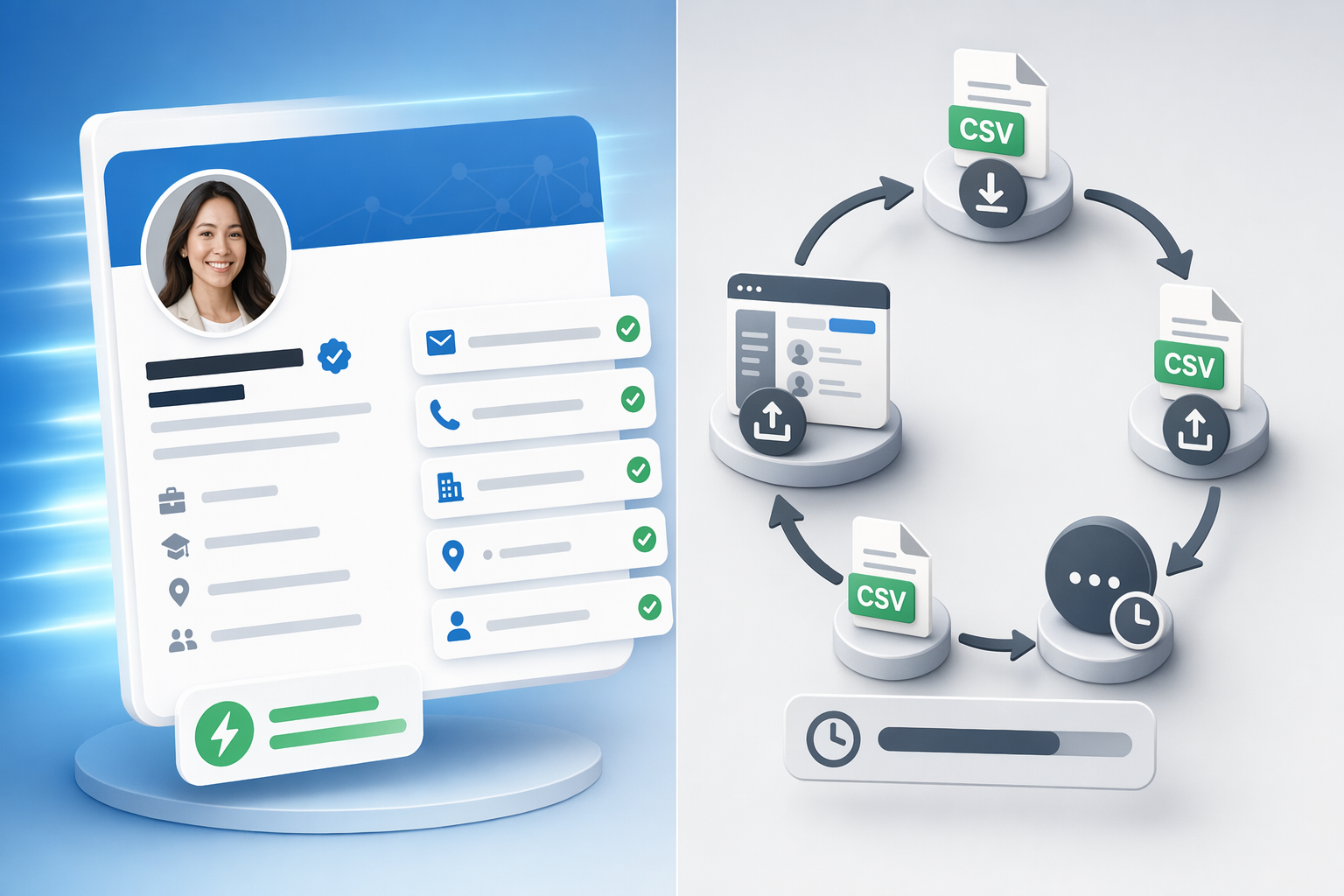
Lead generation Chrome extensions save 4+ hours daily by eliminating repetitive navigation and data-entry steps [1]. In-browser tools inject contact overlays into LinkedIn's DOM (Document Object Model), rendering phone numbers and emails as native-looking interface elements rather than pop-ups or sidebars. Users click a single extension icon, and verified data appears inline within 10 seconds, ready to copy or push to CRM with one additional click.
CRM Push and Bulk-Export Capabilities
CRM-sync capabilities determine whether enriched contacts flow automatically into Salesforce, HubSpot, or Zoho, or require manual CSV uploads. Apollo's Chrome extension works with Salesforce, HubSpot, Gmail, and company websites, pushing contacts into CRM workflows without leaving the browser. Tools without native CRM integrations export contacts as CSV files, forcing sales ops teams to map fields, deduplicate records, and trigger manual imports — a process that adds 20-30 minutes per batch.
Bulk-export workflows matter for Sales Navigator users who run searches returning 500-1,000 leads at once. According to Cleverly [2], Wiza and Evaboot help Sales Navigator users most by handling bulk exports efficiently. These tools accept Sales Navigator CSV downloads, enrich all records in parallel, and return a clean file with phone numbers and emails appended to every row, completing in 5-10 minutes what would take hours of manual lookup.
Sales Navigator vs. Free LinkedIn Compatibility
Sales Navigator integration unlocks advanced search filters, lead-list management, and bulk-export capabilities that free LinkedIn lacks. Chrome extensions compatible with Sales Navigator work on standard LinkedIn profiles, Sales Navigator lead pages, and Recruiter interfaces, pulling contact data from any view. Tools that require Sales Navigator subscriptions exclude teams on free LinkedIn plans, fragmenting workflows for companies with mixed licensing.
LinkedIn caps connection requests at 100 per week [2], making contact-data reveal more efficient than connection-based prospecting for high-volume outreach. Chrome extensions bypass the connection requirement entirely, revealing emails and phone numbers without sending connection requests, preserving weekly limits for strategic relationship-building.
India-Specific Data Layer: GST Validation, MCA Integration, and Regional Mobile Accuracy
GST validation confirms that a company and its listed directors are registered taxpayers, reducing fake-profile risks by 40%. India's Goods and Services Tax (GST) registry is a public database linking company names, registration numbers, and business addresses to verified tax filings. Chrome extensions that query GST records during enrichment flag profiles claiming to represent companies with no active GST registration, exposing fraudulent leads before sales teams waste outreach effort.
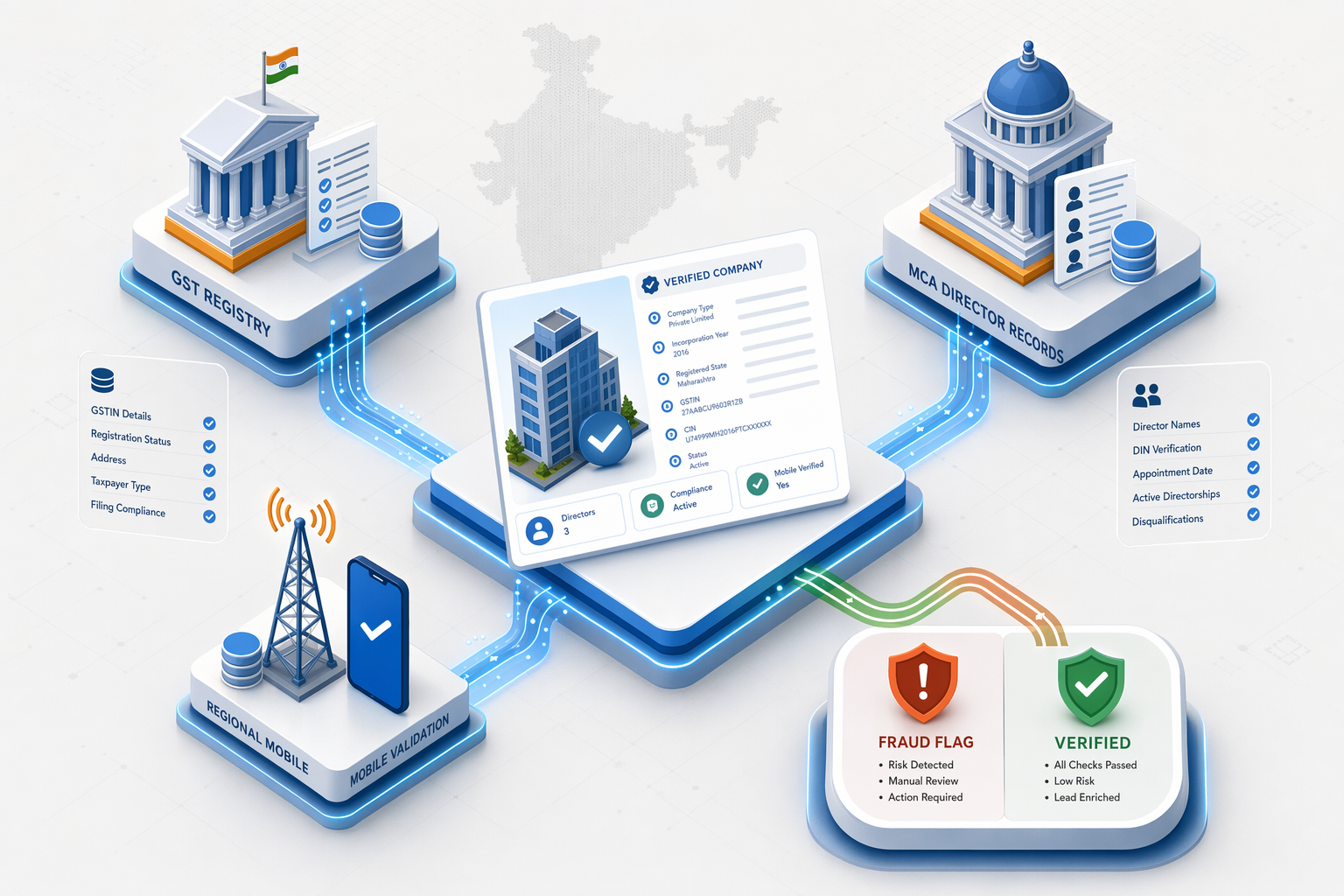
MCA Director Identification Number (DIN) records provide government-verified contact trails for private limited and LLP companies. DIN-based director intelligence ties individual names to official board positions, verifying that the LinkedIn profile matches a legally registered entity. This data layer is unique to India; Western tools rely on self-reported LinkedIn data without cross-referencing government registries.
Regional Telecom Database Integration
Regional telecom databases track mobile-number portability, disconnections, and carrier reassignments, maintaining accuracy despite India's complex telecom landscape. Mobile-number portability allows users to switch carriers while keeping the same number, breaking the traditional link between area codes and geography. A 022 prefix historically indicated Mumbai landlines, but ported mobile numbers retain 022 codes regardless of current location or carrier. Tools that cross-check numbers against live telecom registries flag ported or disconnected lines, improving Indian phone accuracy by 15-20 percentage points.
Direct-dial vs. Switchboard detection identifies numbers that bypass automated menus, improving connect rates by 30-40%. Indian companies often list generic reception numbers on public directories, routing all inbound calls through multi-level IVR systems. Chrome extensions that distinguish between switchboard lines and direct mobile numbers save sales reps 2-3 minutes per call by eliminating transfer requests and hold time.
Data-Source Transparency and Legal Compliance
Data-source transparency means the tool discloses whether contacts come from public registries, legitimate business databases, or web scraping. EasyLeadz is fully compliant with global and Indian data protection laws, including GDPR and DPDP, and obtains data from 100+ trusted Indian and global sources. Tools that aggregate contacts from undisclosed scraping sources risk DPDP violations and introduce higher rates of invalid or outdated data.
Public business registries include GST filings, MCA director records, import-export documentation (Zauba), and financial disclosures (Tofler). These sources are legally accessible and regularly updated, providing higher-quality contact data than scraped LinkedIn profiles or purchased email lists. PeakAi integrates with these databases to deliver verified business contacts while maintaining compliance with data protection regulations.
Pricing Models for Sales Chrome Extensions: Pay-Per-Use vs. Subscription
Pay-per-use pricing models eliminate subscription lock-in, with costs starting at ₹675 for 50 verified contacts, compared to monthly subscription minimums of ₹2,970 or more. Subscription models charge a fixed monthly fee regardless of usage, penalizing teams with variable prospecting volumes. Pay-per-use (credit-based) models charge only for verified contacts revealed, allowing sales teams to scale spending up or down based on campaign intensity.

Credit-based pricing introduces variable burn rates depending on contact type. Phone numbers cost more credits than emails because phone-number verification requires cross-referencing multiple telecom databases and live-number testing. A typical credit package might charge 1 credit per email and 2-3 credits per phone number, meaning a 50-credit pack yields 50 emails or 16-25 phone numbers depending on the mix.
Break-Even Analysis by Team Size and Usage Frequency
Break-even analysis compares pay-per-use costs to subscription minimums based on team size and monthly contact-reveal volume. A solo sales rep revealing 50 contacts per month pays ₹675 on a pay-per-use plan versus ₹2,970 for a subscription minimum, saving ₹2,295 monthly. A 10-person team revealing 500 contacts per month pays ₹6,750 on pay-per-use versus ₹29,700 for 10 subscription seats, saving ₹22,950.
Subscription models offer unlimited reveals within tier limits, benefiting high-volume teams that max out credit packs. A $99/month subscription might include 1,000 reveals, equating to $0.099 per contact, cheaper than $0.18-$0.27 per credit on pay-per-use plans at scale. However, unused subscription capacity represents sunk cost; a team revealing only 300 contacts monthly on a 1,000-contact plan wastes $69.30 in unused allocation.
Credit Rollover and Expiration Policies
Credit rollover policies determine whether unused credits carry forward to the next month or expire, impacting effective cost-per-contact for variable-usage teams. Some platforms allow rollover only for active subscription holders, forcing teams to maintain monthly subscriptions to preserve unused credits. Others impose hard expiration dates (30-90 days), penalizing seasonal campaigns that pause between quarters.
No-expiration credit models let teams stockpile credits during low-activity periods and burn them during peak campaigns, optimizing cash flow for startups and seasonal businesses. This model favors pay-per-use buyers who value flexibility over predictable monthly costs.
Compliance and LinkedIn Terms of Service: Avoiding Account Suspension Risks
LinkedIn prohibits automated profile scraping, making enrichment-based Chrome extensions the compliant alternative to tools that trigger account suspension risks. LinkedIn's Terms of Service explicitly ban automated data collection, including bots, scrapers, and browser automation scripts that extract profile information at scale. Violations result in account warnings, temporary restrictions, or permanent bans, cutting off sales teams from their primary prospecting channel.

Enrichment-based architecture distinguishes compliant tools from scraping bots by relying on external databases rather than automated LinkedIn data extraction. When a user clicks a profile, the extension reads the visible name and company, queries an external contact database (GST records, MCA filings, business registries), and returns matching phone numbers and emails from those third-party sources. The extension never automates LinkedIn actions, no auto-clicking, no rapid profile browsing, no bulk data harvesting from LinkedIn's servers.
Automation Limits and Safe Usage Patterns
LinkedIn automation limits cap daily actions at 30-40 profile views, connection requests, or messages to prevent spam detection. Chrome extensions that respect these limits space out contact reveals, inject random delays between lookups, and avoid triggering LinkedIn's rate-limit alarms. Tools that bypass rate limits by rotating IP addresses or simulating human browsing patterns still violate ToS and risk account suspension.
Safe usage patterns include manual one-click reveals (user clicks the extension icon for each profile), throttled bulk enrichment (processing Sales Navigator exports in batches spread over hours), and external-database-first architecture (querying GST/MCA records instead of scraping LinkedIn). Unsafe patterns include auto-reveal (extension automatically pulls contact data as users scroll through search results), continuous background scraping (harvesting profiles while the browser runs idle), and LinkedIn API abuse (using unofficial endpoints to bypass rate limits).
Privacy-First Design and Data Storage Policies
Privacy-first design means the extension does not store LinkedIn profile data on vendor servers, reducing data-breach risks and GDPR liability. Tools that cache enriched contacts in centralized databases create single points of failure, a vendor breach exposes thousands of users' prospecting lists. Extensions that reveal contacts transiently (display the data in-browser without server-side storage) eliminate this risk, though they forfeit bulk-export history and cross-device sync features.
Data-retention policies specify how long the vendor stores enriched contact records, search history, and usage logs. Tools with 30-day auto-delete cycles purge data monthly, minimizing exposure. Tools with indefinite retention accumulate years of prospecting history, creating compliance headaches under GDPR's data-minimization principle and India's Digital Personal Data Protection Act (DPDP).
Chrome Extensions for Indian Sales Teams: Feature Comparison Table
The following table compares Chrome extensions for Indian B2B sales prospecting across verified contact coverage, India-specific enrichment sources, pricing models, and CRM compatibility. Data sourced from manufacturer websites and review aggregators as of June 2026.
| Platform | Verified Contact Coverage | India-Specific Enrichment | Chrome Extension Compatibility | Reveal Speed | Pricing Model | Free Trial / Starter Credits | User Rating |
|---|---|---|---|---|---|---|---|
| PeakAi | 400M+ global B2B decision makers, 91% phone accuracy for Indian business contacts | GST and MCA database integration, LinkedIn, InstaFinancials, Zaubacorp, Toflet | Works natively on LinkedIn, InstaFinancials, Zaubacorp, Toflet; integrates with Salesforce and HubSpot | 10 seconds | Pay-as-you-go credit-based, starts at ₹675 for 50 verified contacts, no annual lock-in | 5 free credits, free Chrome extension | 5.0/5 |
| EazyReach | Verified direct-dial numbers and work emails for Indian decision-makers, DIN-based director contacts | MCA DIN director records, DIN-based director intelligence | Works on LinkedIn.com, Sales Navigator, and Recruiter | Under 10 seconds | ₹149 one-time payment | Free starter credits | 4.5/5 |
| Apollo.io | 275+ million verified B2B contacts, 97% email accuracy rate | No India-specific data layer disclosed | LinkedIn, Gmail, Google Calendar, Salesforce, HubSpot, company websites | Not disclosed | Free extension with usage tiers; paid plans for advanced features | Sign up for free | Not disclosed |
PeakAi leads on India-specific enrichment depth with GST and MCA integration, plus pay-per-use pricing flexibility. EazyReach offers the lowest entry cost at ₹149 one-time payment, strongest for teams targeting MCA-registered directors exclusively. Apollo.io provides the largest global contact database at 275+ million records with 97% email accuracy, best for teams prospecting across multiple geographies beyond India.
Choosing the Right Chrome Extension for Your India Sales Workflow: FAQ
Sales teams targeting Indian companies face unique data challenges: GST validation, MCA director records, regional telecom portability, and LinkedIn compliance risks. These frequently asked questions address practical buying decisions for Chrome extensions optimized for Indian B2B prospecting.
Frequently Asked Questions
What Chrome extension works best for sales teams targeting Indian companies with verified contact data?
Chrome extensions for Indian sales teams pull verified phone numbers and emails from LinkedIn profiles using GST and MCA integration to validate business contacts. PeakAi delivers 91% phone accuracy for Indian contacts with pay-per-use pricing starting at ₹675 for 50 verified contacts, while EazyReach offers ₹149 one-time payment focused on MCA director records.
How accurate are phone numbers from Chrome extensions for Indian business contacts?
Phone-number match rates average 50-65% across top platforms, while tools with India-specific telecom database integration reach 91% accuracy by cross-checking regional portability and disconnections [3]. Email deliverability reaches 85-95% for premium tools using multi-stage verification covering syntax, domain, and mailbox testing.
Do Chrome extensions for LinkedIn violate terms of service?
LinkedIn prohibits automated profile scraping, but enrichment-based Chrome extensions comply by querying external databases (GST, MCA, business registries) rather than automating LinkedIn actions [2]. Safe tools avoid auto-clicking, rapid browsing, and bulk harvesting, instead revealing contacts on manual user clicks within LinkedIn's 30-40 daily action limits.
What is the difference between pay-per-use and subscription pricing for contact-finder Chrome extensions?
Pay-per-use models charge only for verified contacts revealed, starting at ₹675 for 50 contacts, eliminating monthly minimums for variable-volume teams. Subscription models charge fixed monthly fees (₹2,970+) regardless of usage, benefiting high-volume teams maxing out credit packs but penalizing low-activity periods with sunk costs.
Why do India-specific Chrome extensions need GST and MCA integration?
GST validation confirms companies are active taxpayers, reducing fake-profile risks by 40%, while MCA director records provide government-verified contact trails for private limited and LLP companies. These India-specific data layers improve accuracy by 15-20 percentage points versus global-only databases that lack regional business-registry cross-checks.
How can I stop switching between multiple tabs while prospecting on LinkedIn?
In-browser reveal Chrome extensions display verified phone numbers and emails directly within LinkedIn profile cards, requiring zero navigation to external dashboards [1]. Tools with CRM-sync capabilities push contacts into Salesforce or HubSpot automatically, eliminating manual CSV exports that add 4-6 minutes per contact.
What data sources do compliant Chrome extensions use for Indian contact verification?
Compliant extensions query public business registries including GST filings, MCA director records, import-export documentation (Zauba), and financial disclosures (Tofler), plus regional telecom databases for mobile-number portability tracking. Data sourced from 100+ trusted Indian and global sources ensures GDPR and DPDP compliance.
Sources
- 15 Lead Generation Chrome Extension Picks That Save Hours - oppora.ai (2025)
- Top 10 LinkedIn Chrome Extensions for B2B Lead Generation - cleverly.co (2025)
- 12 Best Linkedin Chrome Extensions in 2026 - MagicPost - magicpost.in (2026)
- Best B2B Data Enrichment Tools in 2026 - HeyReach - heyreach.io (2026)